openapi: 3.1.0
info:
title: Integration Middleware Plugins API
description: |
Integration Middleware is a HTTP API service build by Delivery Hero.
Download [OpenAPI schema](/apidocs/middlewareExternalApi.yaml), corresponding [shared components](/apidocs/shared-components.yaml) and [catalog schema](/apidocs/catalog-schema.yaml).
If you are looking for documentation on POS plugin endpoints, head over to [this page](/apidocs/pos-plugin-api).
The POS clients use it to accept or reject orders delivered to them,
but also to modify the status of each restaurant, or to push a menu update.
The POS clients can also be used to get information [about recent orders](#tag/POS-Order-Report-service).
# Credentials
Apply for credentials by clicking "Get Credentials" on [developers page](https://developers.deliveryhero.com/documentation/pos.html).
# Authentication
### Authentication details
* Authentication for plugins is handled by client side.
* The client has to send authentication details to all endpoints that need to communicate with Middleware, such as `POST /v2/order/status/{orderToken}`.
* These are sent as `Authorization` header by using [Bearer](https://tools.ietf.org/html/rfc6750) authentication scheme to transmit the access token.
* Currently JSON Web Token ([JWT](https://en.wikipedia.org/wiki/JSON_Web_Token)) is used as an authentication token.
* You should acquire a token from the [`/v2/login` endpoint](#operation/Login).
version: 1.0.0
servers:
- url: https://integration-middleware.stg.restaurant-partners.com
description: staging environment
tags:
- name: Auth
description: Resource that handles authentication and token issuing.
- name: Order
description: |
Resources related to order status updates.
The order status updates must be sent to [the callback URL Delivery Hero is providing in the order dispatch payload](/apidocs/pos-plugin-api#tag/Plugin-Endpoints/operation/Dispatch%20Order).
## Product Modification to handle Out-of-stock items
During the order lifecycle, the vendor may find that a subset of product items are not available and they may want
to modify the products to avoid cancelling the order. This feature is called Product Modification and works as
explained below:
1. While creating the order the delivery platform marks the unavailability handling preference for the product
items. This is conveyed to the POS plugins during [Dispatch Order](/apidocs/pos-plugin-api#tag/Plugin-Endpoints/operation/Dispatch%20Order)
operation in `itemUnavailabilityHandling` field at product item level.
2. Vendor calls `order_accepted` operation of [Update Order Status API](#tag/Order/operation/Update%20Order%20Status)
along with product modifications. The order is accepted at this point but the product items are not modified yet.
Please note that the http request is returned at this point and rest of the steps are performed asynchronously.
3. The product modifications are forwarded to the delivery platform on Delivery Hero side.
4. Depending on the response from the delivery platform, the order is modified on Delivery Hero side and the
result of the product modification request is notified to the POS plugin by [Update Order Status](/apidocs/pos-plugin-api#tag/Plugin-Endpoints/operation/Update%20Order%20Status)
callback which can be either `PRODUCT_ORDER_MODIFICATION_SUCCESSFUL` or `PRODUCT_ORDER_MODIFICATION_FAILED`.
5. If the request was successful, POS plugin gets the updated order in the above callback and should update the
order on their side, so that the vendor starts seeing the order with modified products.
- name: Deprecated Menu Import
description: |
This resource creates/updates menus for a specific restaurant and chain. It is now
deprecated and will be replaced by [Catalog Import API](#tag/Catalog-Import).
- name: POS vendor availability status
description: |
Endpoint to inform Middleware about current POS availability (busy) status.
Please contact your point of contact on Ops side to enable this feature for your integration.
- name: POS Order Report service
description: This resource is used to retrieve POS order details
- name: Vendor Information
description: This resource is used to retrieve platform vendor details from Delivery Hero side.
- name: Catalog Import
description: |
The manual process of requesting an Update of Catalog Data from a Vendor on the Delivery Platform
is very time consuming, requires a lot of human resources on both sides and is error prone.
In worst case, it could lead to a bad customer experience, when a customer tries to order something
that is not available anymore. The problem amplifies if the Catalog of Vendor frequently changes.
The Catalog Import API tackles this and allows POS Vendors to push catalog changes automatically
to the Platforms, in order to reduce human effort.
On the other hand, if there are less frequent changes the benefits are outweighed up by the implementation and maintenance overhead. Plugin Maintainers should weigh the benefits against the technical overhead.
The Catalog Import API is the Replacement of the [legacy Menu Import API](#tag/Deprecated-Menu-Import). POS Vendors that want to
automate the process should start with Catalog Import API. New implementations for the legacy Menu Import API are not allowed.
Vendors that are already integrated with the legacy Menu Import API should migrate soon after the new Catalog Import API gets stable to take advantage of the new features and improvements.
An announcement will be made from your local Contact regarding the migration timeline, and the old Menu Importer API deprecation.
## Flow
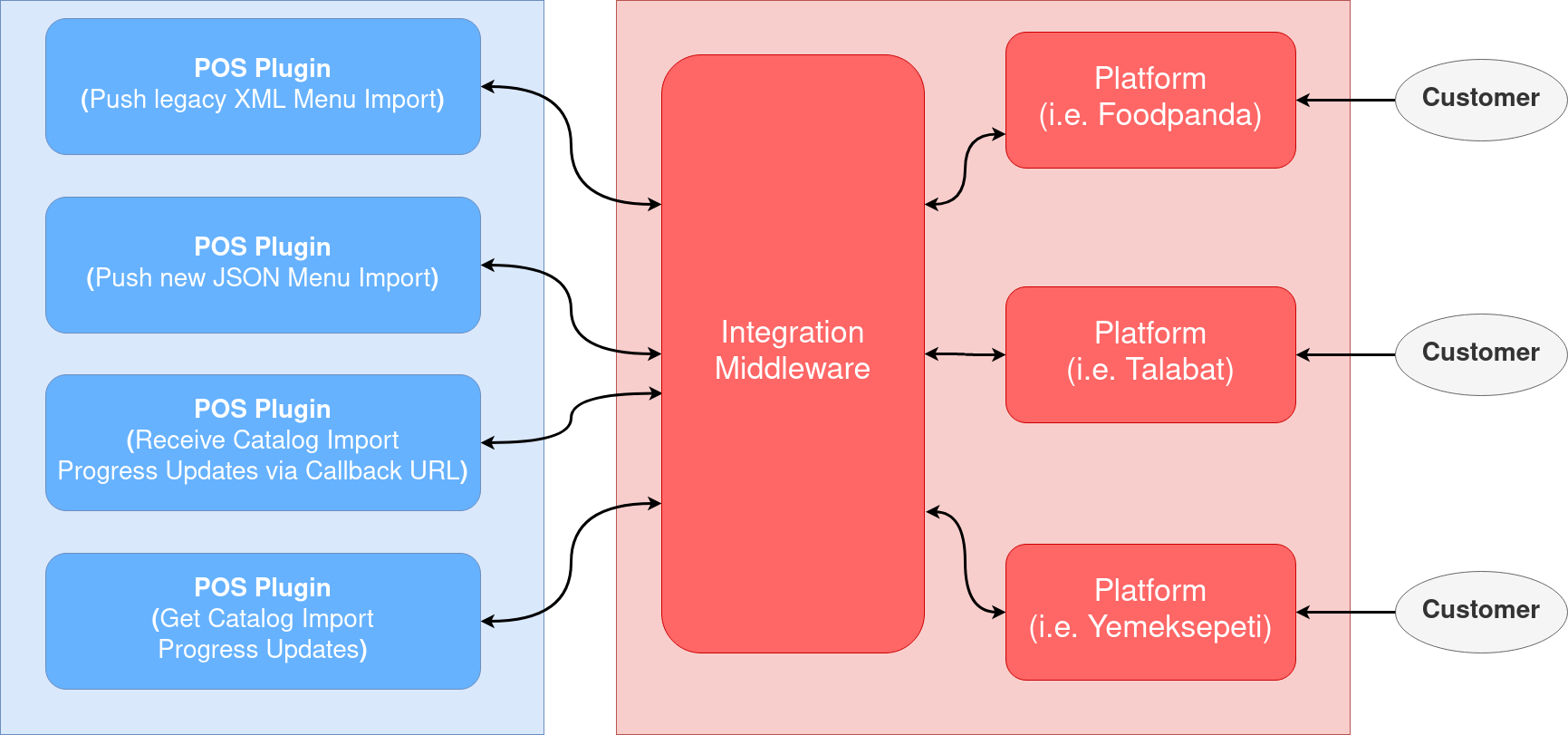
* POS Plugins send Catalog Import to Integration middleware (sync).
* Integration Middleware does a short validation of the request and acknowledges the request (sync).
* Integration Middleware performs the following validations to the catalog (async).
* Validates the catalog data against the JSON schema.
* Validates that images are accessible.
* Validates the properties of images like size, resolutions ...
* Integration Middleware sends the catalog to Delivery Hero platform to show to the customer (async).
* Integration Middleware will send catalog import progress updates back to the callback URL(Provided by the POS plugin) (async).
* POS Plugins are able to send GET request to retrieve catalog import progress updates (async).
## Implementation Details
Here are 2 main parts that need to be implemented by a POS plugin.
1. Creation of Catalog Imports
2. Handling of status updates via callback for ongoing Catalog Imports. The handling of status updates is optional.
The advantage of implementing the status handling (number 2 in the list above) is that the POS plugin will receive feedback regarding a specific Catalog Import request i.e. when it failed or was successfully completed. Refer to [POS plugin API page](/apidocs/pos-plugin-api/#tag/Plugin-Endpoints).
Creation and Sending of Catalog Imports
The Catalog Import API requires the Catalog Import Data to be in JSON Format while the legacy Menu Importer API
requires XML.
It is only supported to push full catalogs for a vendor. The support of partial updates
is planned for the near future.
The new schema is designed in a way that tries to balance between following requirements:
* allowing to incorporate new business requirements in the future.
* to be optimized for processing.
* to make the migration as easy as possible
The schema has a flat structure, with a dictionary/map approach instead of using arrays.
The main building block are Menus, Categories, Products, Toppings, Images or Schedule Entries that
are specialisations of a Base Catalog Item. All items are added to the top level `items` property by using the unique item
id as key. An Id needs also to be passed as a property of the Item to make the processing easier.
Some Item types like a Menu needs associations to other types, like Products, that will be done
by a reference.
Ids have to be unique across the catalog and need to be consistent over time.
**Example (in yaml format for readability):**
```yaml
hamburger:
id: hamburger
type: Product
title: A tasty Hamburger
price: "1.20"
cheesburger:
id: cheeseburger
type: Product
title: A tasty Cheesburger
prive: 1.40
lunchmenu:
id: lunchmenu
title: The Lunch Menu
products:
# a reference to add the hamburger to the menu
hamburger:
id: hamburger
type: Product
order: 1
cheeseburger:
id: cheeseburger
type: Product
order: 2
...
```
Validation rules for Catalog import
The following validation rules are performed on Integration-middleware for every catalog import request.
* A main product does not have a parent field.
This is a main product because it does not have a Parent field:
```yaml
PRODUCT_1:
id: PRODUCT_1
type: Product
title:
default: My first product
active: true
isExpressItem: true
isPrepackedItem: true
excludeDishInformation: true
price: '1.50'
variants:
PRODUCT_VARIANT_1:
id: PRODUCT_VARIANT_1
type: Product
```
This is a Variant and not a main product as it has a Parent field:
```yaml
PRODUCT_VARIANT_1:
id: PRODUCT_VARIANT_1
type: Product
title:
default: My first product variant
active: true
isExpressItem: true
isPrepackedItem: true
excludeDishInformation: true
price: '1.50'
parent:
id: PRODUCT_1
type: Product
```
* Variants are type 'Product' with 'Parent' field - A variant is of type 'Product' with a 'parent' field
present. e.g. The above variant PRODUCT_VARIANT_1 has a parent field with id PRODUCT_1.
* Products can not be nested. - This means that we can not define one product inside another product. If there
is a variant for the product it is defined under 'variants' section under the parent product
* Categories can have main products and variants. - A category can have multiple products and variants but they should not be related.
* Both products and variants belong to the category. If even one product does not not belong to a category, the validation will fail.
e.g. - In the below catalog PRODUCT_1 and PRODUCT_VARIANT_1 does not belong to any category and this will fail the validation.
```yaml
catalog:
items:
PRODUCT_1:
id: PRODUCT_1
type: Product
title:
default: My first product
active: true
isExpressItem: true
isPrepackedItem: true
excludeDishInformation: true
price: '1.50'
variants:
PRODUCT_VARIANT_1:
id: PRODUCT_VARIANT_1
type: Product
PRODUCT_VARIANT_1:
id: PRODUCT_VARIANT_1
type: Product
title:
default: My first product variant
active: true
isExpressItem: true
isPrepackedItem: true
excludeDishInformation: true
price: '1.50'
parent:
id: PRODUCT_1
type: Product
CATEGORY_1:
id: CATEGORY_1
type: Category
title:
default: My first category
products:
ANOTHER_PRODUCT:
id: ANOTHER_PRODUCT
type: Product
name: Invalid catalog with product and variant having no categories
expectedErrorMessages:
- Product or one or more of its variants does not belong to a category
```
* A Product and its variants can not belong to the same category.
e.g. - Here PRODUCT_1 has a variant PRODUCT_VARIANT_1 and both are added to CATEGORY_1
which is invalid.
```yaml
catalog:
items:
PRODUCT_1:
id: PRODUCT_1
type: Product
title:
default: My first product
active: true
isExpressItem: true
isPrepackedItem: true
excludeDishInformation: true
price: '1.50'
variants:
PRODUCT_VARIANT_1:
id: PRODUCT_VARIANT_1
type: Product
PRODUCT_VARIANT_1:
id: PRODUCT_VARIANT_1
type: Product
title:
default: My first product variant
active: true
isExpressItem: true
isPrepackedItem: true
excludeDishInformation: true
price: '1.50'
parent:
id: PRODUCT_1
type: Product
CATEGORY_1:
id: CATEGORY_1
type: Category
title:
default: My first category
products:
PRODUCT_1:
id: PRODUCT_1
type: Product
PRODUCT_VARIANT_1:
id: PRODUCT_VARIANT_1
type: Product
```
* A catalog must contain at least one Category.
e.g. - The below Catalog does not have any category which is invalid.
```yaml
catalog:
items:
PRODUCT_1:
id: PRODUCT_1
type: Product
title:
default: My first product
active: true
isExpressItem: true
isPrepackedItem: true
excludeDishInformation: true
price: '1.50'
variants:
PRODUCT_VARIANT_1:
id: PRODUCT_VARIANT_1
type: Product
PRODUCT_VARIANT_1:
id: PRODUCT_VARIANT_1
type: Product
title:
default: My first product variant
active: true
isExpressItem: true
isPrepackedItem: true
excludeDishInformation: true
price: '1.50'
parent:
id: PRODUCT_1
type: Product
```
Requirements
Here are some conjunctions of the Item properties that are not enforced by the
schema but are required by usage or required by platform.
The id of a Product has to be the same as the remoteId that needs to be sent for that
product to the POS.
All Products that are added to a menu must be have a price, must have all compliance related information
and needs to be associated with at least one Category. The required properties can be inherited from the parent, but must be here.
When a parent product is added to the menu, all child products will be added. The condition above must
be valid for all child products as well.
URLs of images must be immutable (always return the same image for the same URL). If the image changes then
the URL must change otherwise the old image will be always shown.
Image upload limitations
* Maximum file size: **20MB**
* Maximum area: **16Mpx2** (16 Mega pixels square, e.g. 4000x4000px)
* File format:
* GIF
* JPEG
* [Lottie](https://lottiefiles.com/)
* PNG
* SVG
* Tiff
* WebP
*Maximum area* limits how big an image can be with a flexible upper bound, for example, images with:
* ✔️ `4000x4000` has `16Mpx`
* ✔️ `3000x3000` has `9Mpx`
* ✔️ `6000x2000` has `12Mpx`
* ❌ `5000x4000` has `20Mpx`
* ❌ `6000x3000` has `18Mpx`
In short:
* If your image has **less than 4000px in *both* dimensions**, it is **accepted**.
* If your image has **more than 4000px in *one* dimensions**, it **might be accepted**.
* If your image has **more than 4000px in *both* dimensions**, it will be **rejected**.
To optimize the processing the new api allows it to push a new catalog for multiple vendors, if
all of them use the same catalog.
Toppings
A product can contain a collection of choices (toppings). In turn, a topping can contain a collection of Product addons (Products). A topping also defines a minimum and maximum number of Products that might be selected. Products are added by reference. Due to the recursive nature of described relationship, multi-level structures can be transmitted. Structure interpretation as well as graphical representation will vary on each platform, that Delivery Hero supports.
### Platforms that support toppings
* Pandora
* Talabat
* Hungerstation
Talabat topping requirements
Talabat platform allows to have up to 2 topping level structure. For 2 topping level structure the 1st level is always a mutually-exclusive topping and must be provided, even if there is only one single option. To give an example for mutually-exclusive topping, for pizza it would be "crust type", for coffee beverage it could be cup "size". Mutually-exclusive topping means a customer has to select one or another option, but not both.
Each of the 1st level toppings would contain desired product addons (i.e. product). In that case of pizza "crust type" topping it would be "thin" or "pan". In case of coffee "size" topping those options could be "tall", "grande", "venti". Thin, pan, tall, grande, venti - are products. They may have specific additional price (e.g. venti +3).
2nd level of toppings is attached to each specific product addon (i.e. product). Several toppings are possible. For coffee beverage it could be "additional espresso shot", "specific bean type", "milk&dairy alternatives". Each topping can define allowed min/max quantity, to either enable or disable multiple selection of products in frontend.

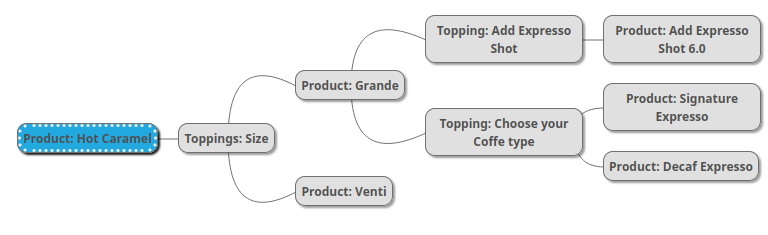
**Talabat catalog topping example with coffee beverages (in yaml format for readability):**
```yaml
items:
HOT_CARAMEL:
id: HOT_CARAMEL
type: Product
price: 23
title:
default: Hot Caramel
toppings:
HOT_CARAMEL_SIZE:
id: HOT_CARAMEL_SIZE
type: Topping
HOT_CARAMEL_SIZE:
id: HOT_CARAMEL_SIZE
type: Topping
title:
default: Size (Choose 1)
quantity:
min: 1
max: 1
products:
SIZE_GRANDE:
id: SIZE_GRANDE
type: Product
SIZE_VENTI:
id: SIZE_VENTI
type: Product
SIZE_GRANDE:
id: SIZE_GRANDE
type: Product
title:
default: Grande
toppings:
ESPRESSO_SHOT:
id: ESPRESSO_SHOT
type: Topping
COFFEE_TYPE:
id: COFFEE_TYPE
type: Topping
MILK_ALTERNATIVE:
id: MILK_ALTERNATIVE
type: Topping
SIZE_VENTI:
id: SIZE_VENTI
type: Product
title:
default: Venti
price: 3
ESPRESSO_SHOT:
id: ESPRESSO_SHOT
type: Topping
quantity:
min: 1
max: 1
title:
default: Add Espresso Shot
products:
ADD_ESPRESSO_SHOT:
id: ADD_ESPRESSO_SHOT
type: Product
COFFEE_TYPE:
id: COFFEE_TYPE
type: Topping
quantity:
min: 1
max: 1
title:
default: Choose your Coffee Type (choose up to 1 item)
products:
ADD_SIGNATURE_ESPRESSO:
id: ADD_SIGNATURE_ESPRESSO
type: Product
ADD_DECAF_ESPRESSO:
id: ADD_DECAF_ESPRESSO
type: Product
MILK_ALTERNATIVE:
id: MILK_ALTERNATIVE
type: Topping
title:
default: Milk & Diary Alternatives (choose up to 1 item)
quantity:
min: 1
max: 1
products:
ADD_WHOLE_MILK:
id: ADD_WHOLE_MILK
type: Product
ADD_SKIMMED_MILK:
id: ADD_SKIMMED_MILK
type: Product
ADD_SOY_MILK:
id: ADD_SOY_MILK
type: Product
ADD_ESPRESSO_SHOT:
id: ADD_ESPRESSO_SHOT
type: Product
title:
default: Add Espresso Shot
price: 6
ADD_SIGNATURE_ESPRESSO:
id: ADD_SIGNATURE_ESPRESSO
type: Product
title:
default: Signature Espresso
ADD_DECAF_ESPRESSO:
id: ADD_DECAF_ESPRESSO
type: Product
title:
default: Decaf Espresso (Dark Roast)
ADD_WHOLE_MILK:
id: ADD_WHOLE_MILK
type: Product
title:
default: Whole Milk
ADD_SKIMMED_MILK:
id: ADD_SKIMMED_MILK
type: Product
title:
default: Skimmed Milk
ADD_SOY_MILK:
id: ADD_SOY_MILK
type: Product
title:
default: Skimmed Milk
```
Pandora (Foodpanda, Fodora, MJAM, ...) Meal For One Menus
To facilitate menus dedicated to a Meal for One for Pandora,
these menus should be tagged with the respective occasion type **MEAL_FOR_ONE**.
```
MEAL_FOR_ONE_MENU:
id: MEAL_FOR_ONE_MENU
type: Menu
tags:
occasionType: MEAL_FOR_ONE
...
```
Menus that are tagged with occasionType as **REGULAR**,
or those lacking an occasionType tag, are treated as standard menus.
The occasionType tag is currently targeted only towards Pandora Platforms.
On other platforms, this tag is ignored, and the menu is treated as a regular menu.
You can find a full tagging example by selecting the **taggedCatalog** example one the right
Meal for One Menus are having the following special requirements and restrictions:
- The schedule of Meal For One Menus must overlap with the schedule of a regular menu
- Products linked to a Meal For One Menu can have only one variant
- This variant must have at least two toppings assigned
Pandora (Foodpanda, Fodora, MJAM, ...) Master Category
Pandora Platforms classify categories under a 'master category' that broadly describes all products within a
certain category. Manually assigning this master category requires significant resources. Every time a new menu
is imported, an agent must manually assign the master categories.
To streamline operations, we encourage integrators and restaurants to include the master category information
during menu import. Available categories can be checked in the category schema.
Note that for platforms not backed by Pandora, the master category tags will be disregarded.
This feature is primarily beneficial for Pandora Platforms to reduce labor and automate catalog management.
You can find a full tagging example by selecting the **taggedCatalog** example one the right
```
DESSERTS:
id: DESSERTS
type: Category
tags:
masterCategory:
- DESSERTS
...
```
Marking age restricted Items
There are specific regulations in many countries for products containing certain substances like alcohol or tobacco
to check there id card before handing over to the customer.
To comply, vendors that are selling such products that are requiring an id card check, must provide the ID_CHECK_18 tag
on the product inside of the catalog. Please note, for products that have a different age restriction, like not selling
it to person under 16, should be marked with the ID_CHECK_18.
```
LIMONCELLO_01:
id: LIMONCELLO_01
type: Product
title:
default: Limoncello Bottle 0.1
description:
default: Limoncello Bottle 0.1
images: { }
variants: { }
toppings: { }
price: '3.50'
tags:
ageRestrictedItem:
- ID_CHECK_18 // Here the product will be marked, to having an id check required
```
Restaurants that sell such items need to appropriately mark these products to avoid legal complications.
To enable this, there's an option to tag age-restricted items.
This helps comply with law enforcement while also transparently informing customers about product restrictions.
You can find a full tagging example by selecting the **taggedCatalog** example one the right
Pandora (Foodpanda, Fodora, MJAM, ...) Bundles
Pandora Bundles
Pandora Bundles constitute products crafted by utilizing a distinct type of toppings referred to as
```PANDORA_PRODUCT_GROUP```. They offer a more methodical approach to modeling choices compared to product’s
featuring regular toppings.
*Notably, this functionality is currently exclusive to Foodpanda in Hong Kong and Yemeksepeti in Turkey,
creating a lack of catalog compatibility with other platforms.*
In essence, Pandora Bundles serve to simulate scenarios like a Pizza Menu, facilitating customers in
selecting pizzas of varying types and sizes, incorporating extra toppings, and choosing a drink—all the
while benefiting from cost savings when compared to purchasing pizza and a drink separately.
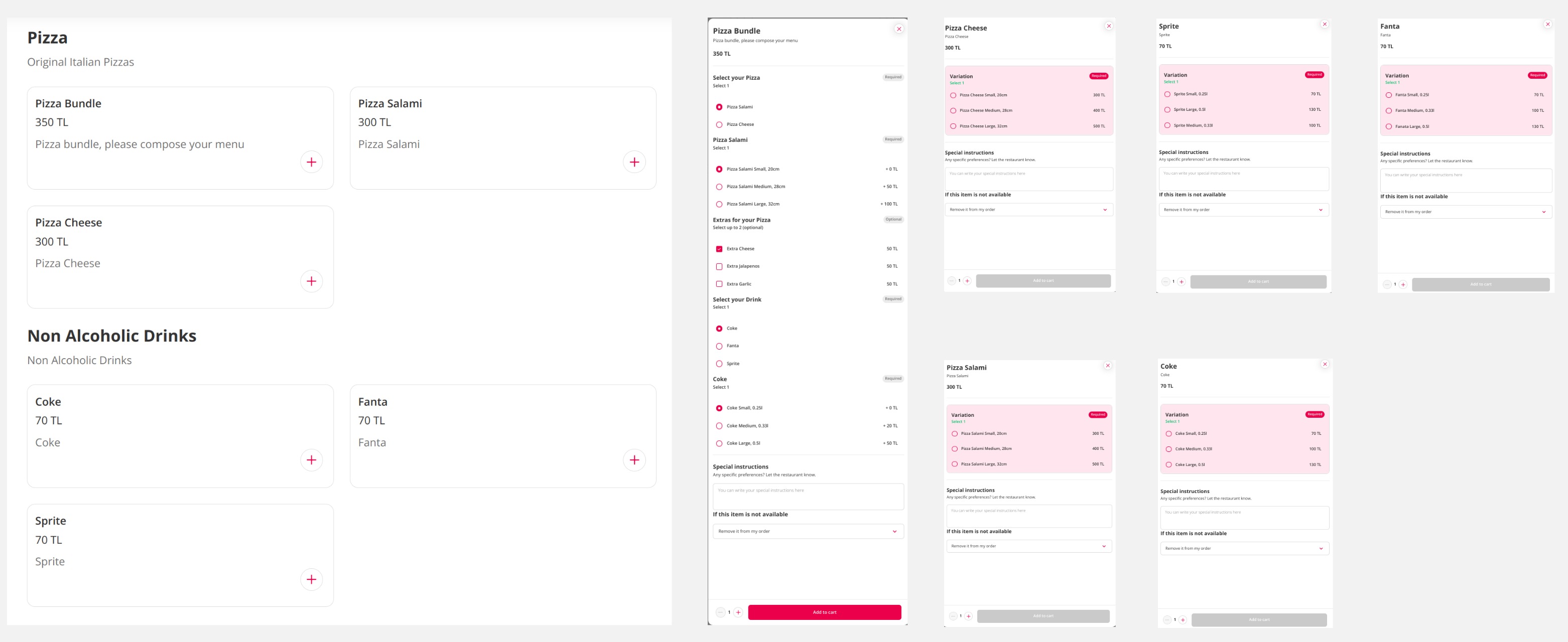
Let's delve into the scenario from the image portraying a basic vendor menu and proceed with catalog modeling.
Before commencing, let's outline the essential components that need to be modeled:
Within the menu, there are two categories: Pizza and Non-Alcoholic Drinks. However, an additional hidden category
is essential to accommodate extras for the pizzas.
Under the Non-Alcoholic Drinks category, there are three products: Coke, Fanta, and Sprite, each offered in small,
medium, and large variants. These products are not only available as part of the Pizza Bundle but can also be
ordered independently.
The Pizza category features three products: Pizza Salami and Pizza Cheese, each offered in small, medium, and
large variations. Additionally, customers have the option to select extra toppings. The third product is the
Pizza Bundle, composed of a pizza selection incorporating Pizza Salami and Pizza Cheese and a drink selection
comprising Coke, Fanta, and Sprite.
Customers have the liberty to choose the following extras for the pizzas: Extra Cheese, Extra Garlic,
and Extra Jalapenos.
In summary, the modeling task involves product and product variant structuring, encompassing the bundle product.
The choices for pizza extras and pizza bundles (toppings, product groups) need delineation.
Category modeling is required to subsequently aggregate all elements into a coherent menu structure.
While we will utilize YAML syntax for clarity in the illustration, it is important to note that in API requests
it must be in JSON format.
We will begin by establishing the pizza extras, namely Extra Cheese, Extra Garlic, and Extra Jalapenos.
These extras are initiated through the creation of three distinct products. These products will serve as
the foundation enabling customers to select additional extras for their pizzas.
This is the product description for Extra Cheese; the remaining two products will follow a comparable format.
You have the option to reference them in the comprehensive catalog example or attempt to create them as an
exercise.
```YAML
EXTRA_CHEESE:
id: EXTRA_CHEESE
type: Product
parent: null
title:
default: Extra Cheese
description:
default: Extra Cheese
images: {}
variants: {}
toppings: {}
```
Upon closer inspection, you will notice the absence of pricing, images, variants, and toppings. For products
intended for regular topping selections, only the basic information like title of a parent products are essential.
Setting the price is part of the topping.
Having established the products for the extras, our next step involves grouping them into a single category.
Within Pandora, a product and its variations must designated to a sole category. To sell the extra products
individually and exclusively alongside the Pizzas, it's advisable to allocate them to a distinct category
concealed from customers. A category remains hidden from customers when none of its products are associated
with a menu item. I opted for the name "Pizza Toppings" for this discrete category.
```YAML
PIZZA_EXTRAS_CATEGORY:
id: PIZZA_EXTRAS_CATEGORY
type: Category
title:
default: Pizza Toppings
description:
default: Hidden Category for Pizza Extra Toppings
products:
EXTRA_CHEESE:
id: EXTRA_CHEESE
type: Product
EXTRA_JALAPENOS:
id: EXTRA_JALAPENOS
type: Product
EXTRA_GARLIC:
id: EXTRA_GARLIC
type: Product
```
In the next step we are creating the Pizza Extras topping which offers customers the choice to select
extra toppings in the UI. With three available options, we aim to enable customers to pick up to
two extras for their pizza. It's important to note that these extras come at an additional cost,
and customers will need to pay for their selections.
```YAML
PIZZA_EXTRAS:
id: PIZZA_EXTRAS
type: Topping
toppingType: PRODUCT_OPTION
title:
default: Extras for your pizza
description:
default: Extras for your pizza
images: {}
quantity:
minimum: 0
maximum: 2
products:
EXTRA_CHEESE:
id: EXTRA_CHEESE
type: Product
price: '50'
EXTRA_JALAPENOS:
id: EXTRA_JALAPENOS
type: Product
price: '50'
EXTRA_GARLIC:
id: EXTRA_GARLIC
type: Product
price: '50'
```
The ```PRODUCT_OPTION``` topping type determines how the products within the topping are utilized.
This method is set as the default behavior. It extracts essential product details from the referenced products
to form the topping. The price customers are required to pay for selecting the option is always specified on
the reference.
With the pizza extras now defined, let's proceed with modeling the Pizza Salami,
beginning with the parent product.
Descriptions and images for the product should be placed on the parent product. Pandora does not consider
descriptions and images at the variant level. Prices and toppings should be specified at the variant level.
While the example lacks images, it is important to include them in an actual menu. For the Parent product,
we need to define the product name, description, and reference the variants.
```YAML
PIZZA_SALAMI:
parent: null
id: PIZZA_SALAMI
type: Product
title:
default: Pizza Salami
description:
default: Pizza Salami
images: {}
variants:
PIZZA_SALAMI_SMALL:
id: PIZZA_SALAMI_SMALL
type: Product
PIZZA_SALAMI_MEDIUM:
id: PIZZA_SALAMI_MEDIUM
type: Product
PIZZA_SALAMI_LARGE:
id: PIZZA_SALAMI_LARGE
type: Product
toppings: {}
```
Creating the variants for Pizza Salami is simple. You are required to specify the parent, name, price,
and select toppings (choices) from the previously defined Pizza Extras.
```YAML
PIZZA_SALAMI_SMALL:
parent:
id: PIZZA_SALAMI
type: Product
id: PIZZA_SALAMI_SMALL
type: Product
title:
default: Pizza Salami Small, 20cm
description:
default: Pizza Salami Small, 20cm
images: {}
variants: {}
toppings:
PIZZA_EXTRAS:
id: PIZZA_EXTRAS
type: Topping
price: '300.00'
```
We will only create the small variant here and let the creation of the other two variants for the Pizza Salami,
the creation of Pizza Cheese and creation of the Drinks as an exercise. I you want to also look it up in the
full example.
After having our Products set up to compose the Pizza Bundle, let's proceed with the creation of the Pizza Bundle.
We will need to generate a Parent Product, a Variant Product, and a unique type of topping known as the
`PANDORA_PRODUCT_GROUP`.
Let's start with the creation of the Parent Product for the Pizza Bundle.
```YAML
PIZZA_BUNDLE:
parent: null
id: PIZZA_BUNDLE
type: Product
isPandoraBundle: true
title:
default: Pizza bundle menu
description:
default: Pizza bundle menu
images: {}
variants:
PIZZA_BUNDLE_VARIANT:
id: PIZZA_BUNDLE_VARIANT
type: Product
toppings: {}
price: null
```
The critical step in creating a Pandora Bundle involves setting the isPandoraBundle flag to true, signaling
that the product requires special handling. There are specific prerequisites to fulfill when forming the bundle.
A product designated as a Pandora Bundle:
* Should be a parent product, with the parent set to null
* Must contain exactly one variant
* Should not include any toppings
* Must not have a price specified; prices are applied recursively. Instead, a base price for the bundle can be
set within the bundle variant.
* You cannot convert an already existing product into a bundle or the opposite around
Subsequently, the creation of a single bundle variant becomes essential. Its primary role is to interconnect
the various choices and establish a base price for the bundle. Here we choosed a base price of 350
```YAML
PIZZA_BUNDLE_VARIANT:
parent:
id: PIZZA_BUNDLE
type: Product
id: PIZZA_BUNDLE_VARIANT
type: Product
title:
default: Pizza bundle
description:
default: Pizza bundle
images: {}
variants: {}
toppings:
PIZZA_CHOICE:
id: SELECT_YOUR_PIZZA
type: Topping
DRINK_CHOICE:
id: SELECT_YOUR_PIZZA
type: Topping
price: '350'
```
Similar to the parent product of the bundle, there are specific conditions to consider for the single variant:
* As it is already a variant, the variants section must be empty.
* The referenced toppings should be of the special topping type: PANDORA_PRODUCT_GROUP.
* The variant must include at least one topping.
Next, we must generate the special PANDORA_PRODUCT_GROUP toppings for the bundles. We will only
create the one for the selection of the pizzas. The one for the drinks will follow the same pattern
an can be looked up as well on the full example
```YAML
SELECT_YOUR_PIZZA:
id: SELECT_YOUR_PIZZA
type: Topping
topping-type: PANDORA_PRODUCT_GROUP
title:
default: Please select your Pizza
description:
default: Please select your Pizza
quantity:
minimum: 1
maximum: 1
products:
PIZZA_SALAMI:
id: PIZZA_SALAMI
type: Product
surcharges
- id: PIZZA_SALAMI_SMALL
type: Product
price: '0'
- id: PIZZA_SALAMI_MEDIUM
type: Product
price: '50'
- id: PIZZA_SALAMI_LARGE
type: Product
price: '100'
PIZZA_CHEESE:
id: PIZZA_CHEESE
type: Product
surcharges:
- id: PIZZA_CHEESE_SMALL
type: Product
price: '0'
- id: PIZZA_CHEESE_MEDIUM
type: Product
price: '50'
- id: PIZZA_CHEESE_LARGE
type: Product
price: '100'
```
If you've noticed or are comparing the toppings used for selecting pizza extras with the special bundle toppings,
there are notable differences. The topping-type is now designated as PANDORA_PRODUCT_GROUP, reflecting a distinct
behavior compared to standard toppings.
This adjustment enables independent price control of the chosen variant within the selection, allowing for
separate product sales at reduced prices. This ensures that the products within the bundle align with the base
price of the bundle, as demonstrated in our case. Moreover, it incorporates nested choices, allowing the selection of pizza extras.
One note you cannot change the topping type of an existing topping.
```YAML
SELECT_YOUR_PIZZA:
type: Topping
...
products:
PIZZA_SALAMI_SMALL:
id: PIZZA_SALAMI_SMALL
type: Product
price: null
...
```
In that case the additional price if you select the small variant will be 300 as stated in the variant.
Now that we have all products for the pizza defined we need to put them into a category. Keep in mind
for PANDORA a product can be only in one category.
```YAML
PIZZA_CATEGORY:
id: PIZZA_CATEGORY
type: Category
title:
default: Pizza
description:
default: Pizza
images: {}
products:
PIZZA_SALAMI:
id: PIZZA_SALAMI
type: Product
PIZZA_CHEESE:
id: PIZZA_CHEESE
type: Product
PIZZA_BUNDLE:
id: PIZZA_BUNDLE
type: Product
```
Creating the products, and choices for the drinks will work the same way. You can find them in the
full example.
Now we are mostly done. The only missing part is the creation of the menu. You can create multiply
menus reusing the same products. But to keep it simple we will create here only one menu.
```YAML
REGULAR_MENU:
id: REGULAR_MENU
type: Menu
title:
default: REGULAR_MENU
description:
default: Our Daily Menu
images: {}
products:
PIZZA_CHEESE:
id: PIZZA_CHEESE
type: Product
PIZZA_SALAMI:
id: PIZZA_SALAMI
type: Product
PIZZA_BUNDLE:
id: PIZZA_BUNDLE
type: Product
COKE:
id: COKE
type: Product
FANTA:
id: FANTA
type: Product
SPRITE:
id: SPRITE
type: Product
schedule:
WEEKLY_SCHEDULE:
type: ScheduleEntry
id: WEEKLY_SCHEDULE
menuType: DELIVERY
```
Here are some things to note when it come to creating the menu. You control which products are
directly sold on the ui by adding them here under products. That also controls which categories
are shown on the ui. If a category contains no products that are added to menu under products, the
category will be not presented to the customer.
Taking our example, we have defined our pizza extras and added them to
an separate ```PIZZA_TOPPINGS``` category. The extras should be not sold directly to the customer
So they don't are added here.
Next thing you should either add the variants if you want to skip some for that specific menu or the
parent product if you want to show all variants to the customer.
Coming to the schedule here some restrictions on Pandora related platforms like Yemek and Foodpanda.
Start time and end time should not overlap over day boundaries. So having the startTime set to
07:00:00 and the endTime set to 01:00:00 on the next day will resulting in an error.
```YAML
WEEKLY_SCHEDULE:
id: WEEKLY_SCHEDULE
type: ScheduleEntry
startTime: '07:00:00'
endTime: '23:00:00'
weekDays:
- MONDAY
- TUESDAY
- WEDNESDAY
- THURSDAY
- FRIDAY
- SATURDAY
- SUNDAY
```
Experimental Food Labeling Support
As global regulations increasingly emphasize transparency and consumer well-being,
providing detailed nutritional information is no longer just good practice—it's a critical
business imperative.
To empower our partners in meeting these evolving demands, we're thrilled to introduce
a groundbreaking new feature within our catalog import API. This enhancement streamlines
the integration of nutritional data, enabling you to effortlessly showcase vital
information and elevate your offerings.
Eager to enrich your menus with comprehensive nutritional details? You can begin
incorporating this information now. Platforms not yet supporting this feature will simply
disregard the data, ensuring a seamless transition when the functionality is universally
available.
Hunger Station is currnetly the only platform that supports this.
To help with the onboarding, we've crafted a generic example to illustrate
the implementation you can find them by selecting the
"catalogWithFoodLabelingInformations" example under the API endpoint on the right.
- name: Catalog Item Availability
description: |
This resource is used to retrieve or update the availability status of POS catalog items.
The endpoint to retrieve a list of unavailable items is still under development and only listed
for completion. We will provide an update when the endpoint reach the production grade.
paths:
/v2/login:
post:
tags:
- Auth
summary: Login
description: Login endpoint to obtain authentication token to make authorized requests
operationId: Login
requestBody:
required: true
content:
application/x-www-form-urlencoded:
schema:
$ref: "shared-components.yaml#/components/schemas/LoginRequest"
example:
username: dummyUserName
password: dummyPassword
grant_type: client_credentials
responses:
200:
description: OK
content:
application/json:
schema:
$ref: "shared-components.yaml#/components/schemas/LoginResponse"
401:
description: Unauthorized
content:
application/json:
schema:
$ref: "shared-components.yaml#/components/schemas/Error"
500:
description: Internal Server Error
content:
application/json:
schema:
$ref: "shared-components.yaml#/components/schemas/Error"
502:
description: Bad Gateway
content:
application/json:
schema:
$ref: "shared-components.yaml#/components/schemas/Error"
/v2/order/status/{orderToken}:
post:
tags:
- Order
operationId: Update Order Status
summary: Update Order Status
description: |
This endpoint should be used to change order status after order has been dispatched to your POS plugin. In the cases when the URL is not present you should not be sending us that type of callback.
More details on each status change events below:
| Allowed status | Description |
| ---------------- | --- |
| order_accepted
| **Note** This status is applicable for direct integration only.
Status `order_accepted` is used to accept the received order. This update must be sent to the url provided in the Order payload callbackUrls array: dispatchOrderPayload.callbackUrls.orderAcceptedUrl.
For an indirect integration, the order will be first accepted on device provided by Delivery Hero. If the URL is not present, you should skip it. |
| order_rejected
| **Note** This status is applicable for direct integration only.
Status `order_rejected` should be used whenever POS provider explicitly rejects the received order. A valid rejection reason must be provided. See the full list with reasons under `Request body schema` section, `order_rejected` example.
This update must be sent to the following url: dispatchOrderPayload.callbackUrls.orderRejectedUrl |
| order_picked_up
| Status `order_picked_up` is only allowed to be used for vendor delivery and pickup orders.
This update must be sent to the following url: [dispatchOrderPayload.callbackUrls.orderPickedUpUrl](https://integration-middleware.eu.restaurant-partners.com/apidocs/pos-plugin-api#tag/Plugin-Endpoints/operation/Dispatch%20Order) If the URL is not present, you should skip it. |
parameters:
- description: |
Unique order identifier in Delivery Hero system. Received in the
`token` field when order was dispatched.
in: path
name: orderToken
required: true
schema:
type: string
security:
- BearerPluginAuth: []
requestBody:
content:
application/json:
schema:
$ref: "shared-components.yaml#/components/schemas/OrderStatusUpdateRequest"
responses:
200:
content:
application/json:
examples:
response:
value:
message: Order status successfully changed.
schema:
properties:
message:
type: string
required:
- message
type: object
description: OK
400:
content:
application/json:
examples:
response:
value:
code: "INVALID_ORDER_STATUS , ORDER_NOT_FOUND, INVALID_REQUEST"
message: dummy error message
schema:
properties:
code:
type: string
message:
type: string
required:
- code
type: object
description: Bad Request
401:
description: Unauthorized
content:
application/json:
schema:
$ref: "shared-components.yaml#/components/schemas/Error"
examples:
response:
value:
code: POS_ERROR
message: dummy error message
403:
description: Forbidden
content:
application/json:
schema:
$ref: "shared-components.yaml#/components/schemas/Error"
examples:
response:
value:
code: FORBIDDEN
message: User is not authorized for this chain
409:
description: |
Response for an invalid order status transition which may happen due to below described cases:
Should be retried
- when trying to accept an order before the [order dispatch request](https://integration-middleware.eu.restaurant-partners.com/apidocs/pos-plugin-api#tag/Plugin-Endpoints/operation/Dispatch%20Order) is successful
Should not be retried
- when trying to accept a cancelled order
- when the plugin is not allowed to update the status of an order e.g. when it is an indirect integration
**Note:** For `order_accepted` status update: If this response is sent in case of an invalid order status transition
the payload contains the **currentState** of the order to allow plugins to appropriately handle the conflict.
If the currentState are ASSIGNED_TO_TRANSPORT or WAITING_FOR_ACKNOWLEDGEMENT then the status update should be retried
to avoid order being stuck and getting cancelled automatically. It is recommended to retry the request every ~10 seconds for next 5 minutes.
content:
application/json:
schema:
$ref: "shared-components.yaml#/components/schemas/OrderStatusUpdateConflict"
examples:
response:
value:
code: INVALID_REQUEST
message: dummy error message
500:
description: Internal Server Error
content:
application/json:
schema:
$ref: "shared-components.yaml#/components/schemas/Error"
examples:
response:
value:
code: INTERNAL_ERROR
message: dummy error message
/v2/orders/{orderToken}/preparation-completed:
post:
tags:
- Order
summary: Mark an order as prepared
description: |
The endpoint should only be used when the order is delivered by Delivery Hero riders. This is to notify the couriers that **food is prepared** and the order can be **picked up** by the rider at the vendor location. Please check with your local contact if this endpoint is applicable to your the plugin or not.
If it is applicable for your plugins, the update must be sent to the following url provided by Delivery Hero over the orderDispatch request payload: [dispatchOrderPayload.callbackUrls.orderPreparedUpUrl](https://integration-middleware.eu.restaurant-partners.com/apidocs/pos-plugin-api#tag/Plugin-Endpoints/operation/Dispatch%20Order). In cases when the URL is not present, you should skip this event for that particular order.
parameters:
- name: orderToken
in: path
required: true
description: |
Unique order identifier in Delivery Hero system. Received in the
`token` field when the order is dispatched.
schema:
type: string
security:
- BearerPluginAuth: []
responses:
200:
description: Order marked as preparation completed
content:
application/json:
schema:
type: object
properties:
code:
type: string
enum:
- OK
example: OK
required:
- code
404:
description: Order Not Found
content:
application/json:
schema:
type: object
properties:
code:
type: string
enum:
- NOT_FOUND
example: NOT_FOUND
required:
- code
401:
description: Unauthorized
content:
application/json:
schema:
type: object
properties:
code:
type: string
enum:
- VALIDATION_ERROR
example: VALIDATION_ERROR
message:
type: string
required:
- code
409:
description: |
Conflict, the current order state of the order does not allow to mark as **preparation completed**
If order is already Cancelled, it cannot be marked as **preparation completed**
content:
application/json:
schema:
type: object
properties:
code:
type: string
enum:
- INVALID_ORDER_STATUS
example: INVALID_ORDER_STATUS
message:
type: string
required:
- code
500:
description: Internal Server Error
content:
application/json:
schema:
type: object
properties:
code:
type: string
enum:
- INTERNAL_ERROR
example: INTERNAL_ERROR
message:
type: string
required:
- code
/v2/orders/{orderToken}/adjust-preparation-time:
post:
tags:
- Order
operationId: AdjustPreparationTime
summary: Adjust the preparation time
description: |
The endpoint should only be used when the order type is Logistics Delivery.
It allows POS integrators to dynamically adjust the original preparation time in order to reflect real-time changes in kitchen workload or operations.
This same endpoint can be used pre and post acceptance for prep time adjustments.
The URL for preparation time adjustment is passed in the callbackUrls.
The POS integrators can adjust the preparation time by updating the expectedPickupAt accordingly. They can adjust the preparation time until the assigned rider has accepted to pick up the order.
The source of the valid range for prep time adjustment information will be dispatch payload. This information includes max pickup time and min pickup time along with default set of adjustments in minutes.
The maximum and minimum range will be calculated based on the original preparation time. Even if the vendor adjusts the time multiple times, the range should still be validated based on the original time.
The request to modify the preparation time is validated against the time range sent with the order dispatch payload - attempts to modify the preparation time with a timestamp below the `minPickUpTimestamp` or above the `maxPickUpTimestamp` will fail.
Below given table shows order status with vendor and rider and if the adjustment is allowed for the same.
| Vendor Accepted | Rider Accepted | Adjustment Allowed |
|-----------------|----------------|-------------------|
| No | No | Yes |
| No | Yes | Yes |
| Yes | Yes | No |
| Yes | No | Yes |
parameters:
- name: orderToken
in: path
required: true
description: |
Unique order identifier in Delivery Hero system. Received in the
`token` field when the order is dispatched.
schema:
type: string
security:
- BearerPluginAuth: []
requestBody:
content:
application/json:
schema:
$ref: "shared-components.yaml#/components/schemas/PreparationTimeAdjustmentRequest"
responses:
204:
description: |
No Content. This code means preparation time has been adjusted successfully.
400:
description: |
Invalid Request e.g. due to invalid field value (validation-error).
preparation_time_adjustment_reject_reason
| Reason | Description|
| -------| ---------- |
| PREPARATION_TIME_EXCEEDS_ALLOWED_MAX_TIME | **Description**: The new preparation time exceeds the maximum value allowed for this country/region. |
| PREPARATION_TIME_BELOW_ALLOWED_MIN_TIME | **Description**: The new preparation time is below the current time or too short to assign a rider properly. |
content:
application/json:
schema:
type: object
properties:
code:
type: string
enum:
- PREPARATION_TIME_EXCEEDS_ALLOWED_MAX_TIME
- PREPARATION_TIME_BELOW_ALLOWED_MIN_TIME
example: PREPARATION_TIME_EXCEEDS_ALLOWED_MAX_TIME
message:
type: string
required:
- code
- message
404:
description: |
Order Not Found
content:
application/json:
schema:
type: object
properties:
code:
type: string
default: NOT_FOUND
message:
type: string
required:
- code
- message
409:
description: |
Order state does not allow setting the preparation time. Possible Scenarios:-
- Order state does not allow setting the preparation time.
- Preparation time cannot be adjusted because the rider has been already assigned
**Note:** The error message can be changed in future to include separate enums for the above cases.
content:
application/json:
schema:
type: object
properties:
code:
type: string
default: conflict-error
message:
type: string
default: The current order state does not allow preparation time adjustment.
required:
- code
- message
500:
description: |
Internal Server Error
content:
application/json:
schema:
type: object
properties:
code:
type: string
default: INTERNAL_ERROR
message:
type: string
required:
- code
- message
/v2/order/{orderToken}/modifications/product:
post:
tags:
- Order
operationId: ModifyOrderProducts
summary: Modify Order Products
description: |
During the order lifecycle, the vendor may find that a product or a subset of product items are not available and they may want to modify the products to avoid cancelling the order.
This endpoint should be used to add or remove products for each order. Before using this endpoint please consider these notes:
- The url should be picked based on the callback urls in the [order dispatch](/apidocs/pos-plugin-api#tag/Plugin-Endpoints/operation/Dispatch%20Order).
- Depending on the response from the delivery platform, the order is modified on Delivery Hero side and the result of the product modification request is notified to the POS plugin by [Update Order Status](/apidocs/pos-plugin-api#tag/Plugin-Endpoints/operation/Update%20Order%20Status) callback which can be either `PRODUCT_ORDER_MODIFICATION_SUCCESSFUL` or `PRODUCT_ORDER_MODIFICATION_FAILED`.
- If the request was successful, POS plugin gets the updated order in the above callback and should update the order on their side, so that the vendor starts seeing the order with modified products.
- There can only be one order modification at a time. Make sure you receive the response on [Update Order Status](/apidocs/pos-plugin-api#tag/Plugin-Endpoints/operation/Update%20Order%20Status) before making a new request.
parameters:
- description: |
Unique order identifier in Delivery Hero system. Received in the
`token` field when order was dispatched.
in: path
name: orderToken
required: true
schema:
type: string
security:
- BearerPluginAuth: []
requestBody:
content:
application/json:
schema:
$ref: "shared-components.yaml#/components/schemas/Modification"
responses:
202:
content:
application/json:
examples:
response:
value:
message: Order modification request has been accepted.
schema:
properties:
message:
type: string
required:
- message
type: object
description: OK
400:
description: Any field validation.
content:
application/json:
examples:
response:
value:
code: "INVALID_ORDER_STATUS , ORDER_NOT_FOUND, INVALID_REQUEST"
message: Any field validation failure
schema:
properties:
code:
type: string
message:
type: string
required:
- code
type: object
401:
description: Unauthorized
content:
application/json:
schema:
$ref: "shared-components.yaml#/components/schemas/Error"
examples:
response:
value:
code: POS_ERROR
message: dummy error message
404:
description: Invalid Order
content:
application/json:
schema:
$ref: "shared-components.yaml#/components/schemas/Error"
examples:
response:
value:
code: NOT_FOUND
message: POS order not found
409:
description: |
If another modification request is ongoing
If the order is not in a state allowed for product modification
content:
application/json:
schema:
$ref: "shared-components.yaml#/components/schemas/OrderStatusUpdateConflict"
examples:
response:
value:
code: INVALID_REQUEST
message: dummy error message
500:
description: Internal Server Error
content:
application/json:
schema:
$ref: "shared-components.yaml#/components/schemas/Error"
examples:
response:
value:
code: INTERNAL_ERROR
message: dummy error message
/v2/chains/{chainCode}/remoteVendors/{posVendorId}/availability:
get:
tags:
- POS vendor availability status
summary: Get availability status
description: |
States if the restaurant is open or closed. If closed, restaurant will be marked as offline on Delivery Hero platform and customers won"t be able to place orders.
**Implementation note:** please take special care about response status code `204`. This means the request is acknowledged,
but the result is not yet available. Please retry in a couple of seconds.
operationId: Availability Status GET
parameters:
- $ref: "shared-components.yaml#/components/parameters/ChainCode"
- $ref: "shared-components.yaml#/components/parameters/PosVendorId"
security:
- BearerPluginAuth: []
responses:
200:
content:
application/json:
examples:
response:
value:
- availabilityState: UNKNOWN
availabilityStates:
- CLOSED_UNTIL
- CLOSED
- OPEN
changeable: false
closedReason: OTHER
closingMinutes:
- 240
- 720
- 120
- 60
- 30
closingReasons:
- TOO_BUSY_KITCHEN
- CLOSED
- TOO_BUSY_NO_DRIVERS
- TECHNICAL_PROBLEM
- UPDATES_IN_MENU
- OTHER
platformId: "12"
platformKey: TB
platformRestaurantId: "123456789"
platformType: TALABAT
- availabilityState: OPEN
availabilityStates:
- CLOSED_UNTIL
- OPEN
changeable: true
closingMinutes:
- 120
- 60
- 30
closingReasons:
- OTHER
platformId: "36"
platformKey: FO_DE
platformRestaurantId: kg6y
platformType: FOODORA
- availabilityState: OPEN
availabilityStates:
- CLOSED_UNTIL
- CLOSED_TODAY
- OPEN
changeable: true
closingMinutes:
- 120
- 60
- 30
closingReasons:
- TOO_BUSY_KITCHEN
- CLOSED
- TOO_BUSY_NO_DRIVERS
- TECHNICAL_PROBLEM
- UPDATES_IN_MENU
- OTHER
platformId: "1"
platformKey: LH_DE
platformRestaurantId: "40788"
platformType: DELIVERY_HERO
schema:
$ref: "#/components/schemas/VendorAvailabilityStatusResponse"
description: OK
204:
description: No Content. This could mean the request is acknowledged, but the result is not yet available. Please retry in a couple of seconds.
400:
content:
application/json:
examples:
response:
value:
code: POS_ERROR
message: dummy error message
schema:
$ref: "shared-components.yaml#/components/schemas/Error"
description: Bad Request
403:
content:
application/json:
examples:
response:
value:
code: FORBIDDEN
message: User not matching
schema:
$ref: "shared-components.yaml#/components/schemas/Error"
description: Authenticated user is not authorized for this chain
404:
content:
application/json:
examples:
response:
value:
code: POS_ERROR
message: dummy error message
schema:
$ref: "shared-components.yaml#/components/schemas/Error"
description: Not Found
500:
content:
application/json:
examples:
response:
value:
code: POS_ERROR
message: dummy error message
schema:
$ref: "shared-components.yaml#/components/schemas/Error"
description: Internal Server Error
put:
summary: Update availability status
tags:
- POS vendor availability status
description: |
Updates the current status of a restaurant - if it is available to receive orders or not.
It should first be checked which kind of availability changes are allowed by making a `GET` request to this endpoint
and verifying that the `changeable` property is true otherwise the request will be unsuccessful.
operationId: Availability Status PUT
parameters:
- $ref: "shared-components.yaml#/components/parameters/ChainCode"
- $ref: "shared-components.yaml#/components/parameters/PosVendorId"
security:
- BearerPluginAuth: []
requestBody:
content:
application/json:
schema:
anyOf:
- $ref: "shared-components.yaml#/components/schemas/PosAvailabilityOpenPUTRequest"
- $ref: "shared-components.yaml#/components/schemas/PosAvailabilityClosePUTRequest"
responses:
200:
description: OK
400:
description: Bad Request
content:
application/json:
examples:
response:
value:
code: POS_ERROR
message: dummy error message
schema:
$ref: "shared-components.yaml#/components/schemas/Error"
403:
content:
application/json:
examples:
response:
value:
code: FORBIDDEN
message: User not matching
schema:
$ref: "shared-components.yaml#/components/schemas/Error"
description: Authenticated user is not authorized for this chain
404:
description: Not Found
content:
application/json:
examples:
response:
value:
code: POS_ERROR
message: dummy error message
schema:
$ref: "shared-components.yaml#/components/schemas/Error"
500:
description: Internal Server Error
content:
application/json:
examples:
response:
value:
code: POS_ERROR
message: dummy error message
schema:
$ref: "shared-components.yaml#/components/schemas/Error"
/v2/chains/{chainCode}/catalog:
put:
summary: Submit a catalog
operationId: Submit a catalog
tags:
- Catalog Import
description: |
Submit a catalog import for one or more vendors belonging to the same chain.
security:
- BearerPluginAuth: []
parameters:
- $ref: "shared-components.yaml#/components/parameters/ChainCode"
requestBody:
description: The catalog to be imported including the vendor(s) it belongs to.
content:
application/json:
schema:
$ref: "#/components/schemas/CatalogImportRequest"
examples:
simpleCatalog:
$ref: "catalogExamples.yaml#/simpleCatalog"
complexCatalog:
$ref: "catalogExamples.yaml#/complexCatalog"
sortedTranslatedProductsInCategoryCatalog:
$ref: "sortedTranslatedProductsInCategoryCatalog.yaml#/sortedTranslatedProductsInCategoryCatalog"
sortedToppingInChoiceGroupCatalog:
$ref: "sortedToppingInChoiceGroupCatalog.yaml#/sortedToppingInChoiceGroupCatalog"
sortedChoiceGroupInProductCatalog:
$ref: "sortedChoiceGroupInProductCatalog.yaml#/sortedChoiceGroupInProductCatalog"
taggedCatalog:
$ref: "taggedCatalog.yaml#/taggedCatalog"
pandoraBundleCatalog:
$ref: "pandoraBundleCatalog.yaml#/pandoraBundleCatalog"
catalogWhitFoodLabelingInformations:
$ref: "catalogWithFoodLabelingInformations.yaml#/catalogWithFoodLabelingInformations"
callbacks:
catalogStatusUpdate:
"{$request.body#/callbackUrl}":
post:
tags:
- Catalog Import callback Endpoints
description: |
Callback to get status updates about the catalog import.
requestBody:
description: Catalog import status
content:
application/json:
schema:
$ref: "#/components/schemas/CatalogImportCallbackRequest"
responses:
200:
description: |
Plugin server implementation should return this HTTP status code. if the data was received successfully
responses:
202:
description: Catalog import request successfully submitted.
content:
application/json:
schema:
$ref: "#/components/schemas/CatalogImportResponse"
401:
description: authentication error.
content:
application/json:
schema:
$ref: "#/components/schemas/CatalogImportRequestError"
400:
description: bad request due to validation failed.
content:
application/json:
schema:
$ref: "#/components/schemas/CatalogImportRequestError"
404:
description: chainCode or vendor not found.
content:
application/json:
schema:
$ref: "#/components/schemas/CatalogImportRequestError"
500:
description: internal error.
content:
application/json:
schema:
$ref: "#/components/schemas/CatalogImportRequestError"
/v2/chains/{chainCode}/vendors/{posVendorId}/platform-vendors:
get:
summary: Retrieve vendors metadata like Platform Vendor Information for a given POS vendor (coming soon, not yet implemented)
operationId: Retrieve platform vendors
tags:
- Vendor Information
description: |
Retrieve platform vendors for a given POS vendor id (coming soon, not yet implemented)
security:
- BearerPluginAuth: []
parameters:
- $ref: "shared-components.yaml#/components/parameters/ChainCode"
- $ref: "shared-components.yaml#/components/parameters/PosVendorId"
responses:
200:
content:
application/json:
schema:
$ref: "#/components/schemas/PlatformVendorsResponse"
description: OK
400:
description: bad request due to validation failed.
content:
application/json:
schema:
$ref: "#/components/schemas/PlatformVendorsRequestError"
401:
description: authentication error.
content:
application/json:
schema:
$ref: "#/components/schemas/PlatformVendorsRequestError"
403:
description: forbidden.
content:
application/json:
schema:
$ref: "#/components/schemas/PlatformVendorsRequestError"
404:
description: chainCode or vendor not found.
content:
application/json:
schema:
$ref: "#/components/schemas/PlatformVendorsRequestError"
500:
description: internal error.
content:
application/json:
schema:
$ref: "#/components/schemas/PlatformVendorsRequestError"
/v2/chains/{chainCode}/global-entity/{globalEntityId}/catalog:
put:
summary: |
Submit a Catalog for a set of Centralized Kitchen Vendors.
operationId: Submit a Catalog for a set of Centralized Kitchen Vendors
tags:
- Catalog Import
description: |
Submits a catalog import for one or more centralized kitchen vendors (using platform vendor identifiers instead of POS vendor identifiers)
belonging to the same chain and sharing a common global-entity
security:
- BearerPluginAuth: []
parameters:
- $ref: "shared-components.yaml#/components/parameters/ChainCode"
- $ref: "shared-components.yaml#/components/parameters/GlobalEntityId"
requestBody:
description: The catalog to be imported including the centralized kitchen vendors it belongs to.
content:
application/json:
schema:
$ref: "#/components/schemas/PlatformVendorsCatalogImportRequest"
examples:
platformSimpleCatalog:
$ref: "#/components/examples/platformSimpleCatalog"
platformComplexCatalog:
$ref: "catalogExamples.yaml#/platformComplexCatalog"
callbacks:
catalogStatusUpdate:
"{$request.body#/callbackUrl}":
post:
tags:
- Catalog Import callback Endpoints
description: |
Callback to get status updates about the catalog import.
requestBody:
description: Catalog import status
content:
application/json:
schema:
$ref: "#/components/schemas/CatalogImportCallbackRequest"
responses:
200:
description: |
Plugin server implementation should return this HTTP status code if the data was received successfully.
responses:
202:
description: Catalog import request successfully submitted.
content:
application/json:
schema:
$ref: "#/components/schemas/CatalogImportResponse"
401:
description: authentication error.
content:
application/json:
schema:
$ref: "#/components/schemas/CatalogImportRequestError"
400:
description: bad request due to validation failed.
content:
application/json:
schema:
$ref: "#/components/schemas/CatalogImportRequestError"
404:
description: chainCode or vendor not found.
content:
application/json:
schema:
$ref: "#/components/schemas/CatalogImportRequestError"
500:
description: internal error.
content:
application/json:
schema:
$ref: "#/components/schemas/CatalogImportRequestError"
/v2/chains/{chainCode}/vendors/{posVendorId}/menu-import-logs:
get:
tags:
- Catalog Import
description: |
Get the logs of the catalog imports executed for a particular vendor.
Time frame for queries are restricted to the last 30 days.
operationId: Get Catalog Import Logs
summary: Get Catalog Import Logs
parameters:
- in: path
name: chainCode
description: The unique identifier of the chain that the vendor belongs to.
schema:
type: string
required: true
- in: path
name: posVendorId
description: The unique identifier of the vendor on the POS side.
schema:
type: string
required: true
example: pyhhud
- in: query
description: |
Entry creation date.
Accepts any timezone date time in ISO_8601 format.
Would default to current date/time, when
is older the from or is older then 30 day or is not an valid date/time string.
example: 2016-01-02T00:00:00Z
name: from
required: false
schema:
type: string
- in: query
description: |
Entry creation date.
Accepts any timezone date time in ISO_8601 format.
Would default to the current date/time.
example: 2016-01-02T23:59:00Z
name: to
required: false
schema:
type: string
- in: query
description: |
Number of entries to return for each vendorCodes.
Maximum value allowed is 100.
example: "5"
name: limit
required: false
schema:
default: "1"
type: string
- in: query
description: Ascending/Descending by createdAt.
example: desc
name: sort
required: false
schema:
default: desc
enum:
- desc
- asc
type: string
security:
- BearerPluginAuth: []
responses:
200:
content:
application/json:
schema:
$ref: "shared-components.yaml#/components/schemas/MenuImportLogPosResponse"
examples:
response:
value:
menuImportLogs:
pyhhud:
- createdAt: 2016-01-02T16:56:00Z
menuImportId: n2cp-1449160200
message: ""
status: in_progress
url: ""
version: 1
- createdAt: "2016-01-02T16:56:05Z"
menuImportId: n2cp-1449160200
message: Import successful
version: 1
description: OK
400:
description: Bad Request
content:
application/json:
schema:
$ref: "shared-components.yaml#/components/schemas/Error"
401:
description: Unauthorized
content:
application/json:
schema:
$ref: "shared-components.yaml#/components/schemas/Error"
500:
description: Internal Server Error
content:
application/json:
schema:
$ref: "shared-components.yaml#/components/schemas/Error"
/v2/chains/{chainCode}/remoteVendors/{posVendorId}/menuImport:
post:
summary: Submit a menu (XML)
operationId: Submit a menu import
deprecated: true
tags:
- Deprecated Menu Import
description: |
This API is now deprecated and will be replaced with the [Catalog Import API](#tag/Catalog-Import)
### Image Requirements
* Minimum image size must be `640 x 270` (width x height).
* If plugin cannot provide images with those dimensions, image element should be submitted as empty `, otherwise menu import will be marked as failed.
### Products order
* The order of menu elements displayed to customers matches the order in which they appear on the xml.
* Position of toppings or choices inside a topping template cannot be set.
The full specification of the menu import is defined in the [XML schema](https://menu-importer.eu.restaurant-partners.com/apidocs/schemas/menu/xml).
security:
- BearerPluginAuth: []
parameters:
- $ref: "shared-components.yaml#/components/parameters/ChainCode"
- $ref: "shared-components.yaml#/components/parameters/PosVendorId"
requestBody:
content:
application/xml:
examples:
VendorMenuXML:
$ref: "shared-components.yaml#/components/examples/VendorMenuXML"
responses:
200:
content:
application/json:
examples:
response:
value:
status: SUBMITTED
schema:
$ref: "shared-components.yaml#/components/schemas/SuccessAcknowledged"
description: OK
404:
content:
application/json:
examples:
response:
value:
code: NOT_FOUND
message: Vendor not found
schema:
$ref: "shared-components.yaml#/components/schemas/Error"
description: Not Found
500:
content:
application/json:
examples:
response:
value:
code: POS_ERROR
message: dummy error message
schema:
$ref: "shared-components.yaml#/components/schemas/Error"
description: Internal Server Error
/v2/menu/{vendorCode}/{menuImportId}:
post:
summary: Submit a menu (XML) in response to a trigger import request
operationId: Submit a menu import due to a trigger
deprecated: true
tags:
- Deprecated Menu Import
description: |
This API is now deprecated and will be replaced with the [Catalog Import API](#tag/Catalog-Import)
This endpoint is used to import a menu as a response to a trigger request. The parameters for this endpoint are sent to the plugin in the trigger request (See [menu import trigger documentation](/apidocs/pos-plugin-api#operation/Trigger%20Menu%20Import))
### Image Requirements
* Minimum image size must be `640 x 270` (width x height).
* If plugin cannot provide images with those dimensions, image element should be submitted as empty `, otherwise menu import will be marked as failed.
### Products order
* The order of menu elements displayed to customers matches the order in which they appear on the xml.
* Position of toppings or choices inside a topping template cannot be set.
The full specification of the menu import is defined in the [XML schema](https://menu-importer.eu.restaurant-partners.com/apidocs/schemas/menu/xml).
security:
- BearerPluginAuth: []
parameters:
- name: vendorCode
in: path
description: Unique identifier of the **vendor** on the logistics side. This is sent to the plugin in the menu import trigger request.
schema:
type: string
example: VENDOR_CODE_0001
required: true
- name: menuImportId
in: path
description: Unique identifier to assign the menu when importing. This is sent to the plugin in the menu import trigger request.
schema:
type: string
example: MENU_ID_007
required: true
requestBody:
content:
application/xml:
examples:
VendorMenuXML:
$ref: "shared-components.yaml#/components/examples/VendorMenuXML"
responses:
200:
content:
application/json:
examples:
response:
value:
status: SUBMITTED
schema:
$ref: "shared-components.yaml#/components/schemas/SuccessAcknowledged"
description: OK
404:
content:
application/json:
examples:
response:
value:
code: POS_ERROR
message: error message
schema:
$ref: "shared-components.yaml#/components/schemas/Error"
description: Not Found
500:
content:
application/json:
examples:
response:
value:
code: POS_ERROR
message: error message
schema:
$ref: "shared-components.yaml#/components/schemas/Error"
description: Internal Server Error
/v2/chains/{chainCode}/remoteVendors/{posVendorId}/posReachabilityStatus:
put:
deprecated: true
summary: Update POS reachability status
description: |
This endpoint is deprecated. We are currently in planning for a proper replacement of it. Integrations that
currently not using this endpoint should not start to using it. Integration that are still usining this endpoint
can continue to use it. In the meantime, we recommend creating your own solution based on the availability API
that we provide.
This endpoint is used to notify Delivery Hero systems when a POS device goes online or offline.
As a result, the respective restaurant will be taken online or offline on each of the Delivery Hero platforms.
Currently only Foodora, Foodpanda and Talabat platforms are supported.
operationId: Update POS Reachability Status
tags:
- POS vendor availability status
parameters:
- $ref: "shared-components.yaml#/components/parameters/ChainCode"
- $ref: "shared-components.yaml#/components/parameters/PosVendorId"
security:
- BearerPluginAuth: []
requestBody:
content:
application/json:
schema:
$ref: "shared-components.yaml#/components/schemas/PosReachabilityStatusUpdate"
responses:
202:
description: Accepted
content:
application/json:
schema:
$ref: "shared-components.yaml#/components/schemas/PosReachabilityStatusUpdate"
400:
description: Bad Request
content:
application/json:
examples:
response:
value:
code: POS_ERROR
message: dummy error message
schema:
$ref: "shared-components.yaml#/components/schemas/Error"
403:
description: Forbidden
content:
application/json:
examples:
response:
value:
code: FORBIDDEN
message: Vendor configuration issue, please reach out to your Point of Contact with Delivery Hero.
schema:
$ref: "shared-components.yaml#/components/schemas/Error"
500:
description: Internal Server Error
content:
application/json:
examples:
response:
value:
code: POS_ERROR
message: dummy error message
schema:
$ref: "shared-components.yaml#/components/schemas/Error"
/v2/chains/{chainCode}/orders/ids:
get:
tags:
- POS Order Report service
operationId: Get List of Order Ids
summary: |
Get list of order identifiers
description: |
Get a list of all order identifiers for the previous specified hours filtered by specific chain and order status.
Currently cancelled and accepted orders are supported.
Filter conditions can also be extended to filter orders belonging to distinct vendors of a chain.
security:
- BearerPluginAuth: []
parameters:
- name: chainCode
in: path
required: true
description: |
Unique identifier of a chain in integration middleware, should be provided
by the local team.
schema:
type: string
- name: status
in: query
required: true
description: |
To query the orders by status. `cancelled` and `accepted` status are supported at the moment. In all other cases
a Bad Request will be returned.
schema:
type: string
enum:
- cancelled
- accepted
- name: pastNumberOfHours
in: query
required: false
description: Specify a time frame to fetch order identifier in hours.
schema:
type: number
minimum: 1
maximum: 24
default: 24
- name: vendorId
description: Unique identifier of a vendor on the POS plugin side.
in: query
required: false
schema:
type: string
responses:
200:
description: List of order identifiers based on query parameters.
content:
application/json:
schema:
$ref: "#/components/schemas/OrderIdentifiersResponse"
400:
content:
application/json:
examples:
response:
value:
code: "INVALID_ORDER_STATUS, ORDER_NOT_FOUND, INVALID_REQUEST"
message: dummy error message
schema:
properties:
code:
type: string
message:
type: string
required:
- code
type: object
description: Bad Request
401:
description: Unauthorized
content:
application/json:
schema:
$ref: "shared-components.yaml#/components/schemas/Error"
examples:
response:
value:
code: POS_ERROR
message: dummy error message
500:
description: Internal Server Error
content:
application/json:
schema:
$ref: "shared-components.yaml#/components/schemas/Error"
examples:
response:
value:
code: INTERNAL_ERROR
message: dummy error message
/v2/chains/{chainCode}/orders/{orderId}:
get:
operationId: Get Order Details
tags:
- POS Order Report service
summary: |
Get order details
description: |
Gets detailed information of an order, typically to be used together with
the **Get List of Order Ids** endpoint.
security:
- BearerPluginAuth: []
parameters:
- in: path
name: orderId
description: |
Unique identifier of an order, that is returned inside of the response of a
**Get List of Order Id's** request
schema:
type: string
required: true
- in: path
name: chainCode
description: The unique identifier of the chain that the order belongs to.
schema:
type: string
required: true
responses:
200:
description: Order details
content:
application/json:
schema:
$ref: "#/components/schemas/OrderDetailsResponse"
400:
content:
application/json:
examples:
response:
value:
code: "INVALID_ORDER_STATUS, ORDER_NOT_FOUND, INVALID_REQUEST"
message: dummy error message
schema:
properties:
code:
type: string
message:
type: string
required:
- code
type: object
description: Bad Request
401:
description: Unauthorized
content:
application/json:
schema:
$ref: "shared-components.yaml#/components/schemas/Error"
examples:
response:
value:
code: POS_ERROR
message: dummy error message
403:
description: Forbidden
content:
application/json:
schema:
$ref: "shared-components.yaml#/components/schemas/Error"
examples:
response:
value:
code: FORBIDDEN
message: dummy error message
500:
description: Internal Server Error
content:
application/json:
schema:
$ref: "shared-components.yaml#/components/schemas/Error"
examples:
response:
value:
code: INTERNAL_ERROR
message: dummy error message
/v2/chains/{chainCode}/vendors/{posVendorId}/catalog/items/availability:
put:
summary: Update catalog item availability
operationId: Update catalog item availability
tags:
- Catalog Item Availability
description: |
Submit availability updates for one or more catalog items for the POS vendor specified in the path parameter
security:
- BearerPluginAuth: [ ]
parameters:
- in: path
name: chainCode
description: The unique identifier of the chain that the vendor belongs to.
schema:
type: string
required: true
- in: path
name: posVendorId
description: The unique identifier of the vendor on the POS side.
schema:
type: string
required: true
example: pyhhud
requestBody:
description: The catalog item whose availability should be updated alongside some meta information
content:
application/json:
schema:
$ref: "#/components/schemas/CatalogItemAvailabilityUpdateRequest"
responses:
204:
description: when Catalog Item Availability update succeeds without any failure. The response body will be empty.
200:
description: When requested operation succeeds partially
content:
application/json:
schema:
$ref: "#/components/schemas/UpdateItemAvailabilityResponse"
400:
description: Bad Request
content:
application/json:
schema:
oneOf:
- $ref: "shared-components.yaml#/components/schemas/Error"
- $ref: "#/components/schemas/UpdateItemAvailabilityResponse"
401:
description: Unauthorized
content:
application/json:
schema:
$ref: "shared-components.yaml#/components/schemas/Error"
500:
description: Internal Server Error
content:
application/json:
schema:
$ref: "shared-components.yaml#/components/schemas/Error"
502:
description: Bad Gateway
content:
application/json:
schema:
$ref: "shared-components.yaml#/components/schemas/Error"
/v2/chains/{chainCode}/vendors/{posVendorId}/catalog/items/unavailable:
get:
summary: |
[IN DEVELOPMENT] Get Unavailable Toppings & Items for the given `chainCode` and `posVendorId` combination
operationId: Get items unavailability
tags:
- Catalog Item Availability
description: |
Get items and topping unavailable for all platforms for a given POS Vendor and Chain code combination.
This endpoint is still in development and is only listed for completion. We will provide an update
and updating the documentation when the endpoint reach the production grade.
security:
- BearerPluginAuth: []
parameters:
- in: path
name: chainCode
description: The unique identifier of the chain that the vendor belongs to.
schema:
type: string
required: true
- in: path
name: posVendorId
description: The unique identifier of the vendor on the POS side.
schema:
type: string
required: true
example: pyhhud
responses:
200:
description: When item unavailability is returned from remote service
content:
application/json:
schema:
type: array
items:
$ref: "#/components/schemas/PlatformItemUnavailability"
400:
description: Bad Request
content:
application/json:
schema:
$ref: "shared-components.yaml#/components/schemas/Error"
401:
description: Unauthorized
content:
application/json:
schema:
$ref: "shared-components.yaml#/components/schemas/Error"
500:
description: Internal Server Error
content:
application/json:
schema:
$ref: "shared-components.yaml#/components/schemas/Error"
/v2/chains/{chainCode}/globalEntityId/{globalEntityId}/restaurant/{platformVendorId}/modify-product:
put:
summary: |
Modify Product details
operationId: Modify Product details
tags:
- Modify Product Details
description: |
Submit a request to modify details of a Product/Options for a Platform Restaurant
### Supported Platforms
* Pandora
Supported update cases on Pandora Platform
| Use-case | Description | Supported | Not supported |
|----------|-------------|-----------|---------------|
| Set parent product availability to active/inactive | | ✅ | |
| Add/update product name for a specific locale | | ✅ | |
| Update product name | | ✅ | |
| Delete product name for a specific locale | | ✅ | |
| Update product description with any text or null | | ✅ | |
| Delete product description for one of the locales | | ✅ | |
| Update product description for other locale | | ✅ | |
| Update product price to 0 or a positive decimal value| | ✅ | |
| Update tags | Each request will append to existing tag array with provided value | ✅ | |
| Update packaging charges with positive value | | ✅ | |
| Delete product | | ✅ | |
| Link existing product option to a topping | | ✅ | |
| Delete product option from a topping | | ✅ | |
| Set child product availability to active/inactive | | | ❌ |
| Update category position | | | ❌ |
| Callback is not supported yet | | | ❌ |
security:
- BearerPluginAuth: []
parameters:
- in: path
name: chainCode
description: The unique identifier of the chain that the vendor belongs to.
schema:
type: string
required: true
example: chainOfSomeRestaurants
- in: path
name: globalEntityId
description: Global identifier that the Platform Restaurant belongs to
schema:
type: string
required: true
example: FP_PK
- in: path
name: platformVendorId
description: The unique identifier for the Restaurant on the platform
schema:
type: string
required: true
example: restaurantId1
requestBody:
description: The details of the products that need to be modified
content:
application/json:
schema:
$ref: "#/components/schemas/ProductUpdateRequest"
examples:
UpdateProductNameAndDescriptionExample:
summary: Update product name and description
value:
processId: processIdOne
batchId: batchIdOne
timestamp: "2023-06-05T10:00:00Z"
timestampLastChange: "2023-06-04T08:00:00Z"
callback: "https://example.com/callback"
product:
description: Updated product description
descriptions:
- locale: en-US
value: Updated product description (en-US)
action: upsert
updatedFields:
- value
- locale: es-ES
value: Descripción de producto actualizada (es-ES)
action: upsert
updatedFields:
- value
name: Updated Product
names:
- locale: en-US
value: Updated Product (en-US)
action: upsert
updatedFields:
- value
- locale: es-ES
value: Producto actualizado (es-ES)
action: upsert
updatedFields:
- value
productId: productIdOne
parentId: parentIdOne
action: upsert
updatedFields:
- name
- names
- description
- descriptions
ChangeProductPriceExample:
summary: Update product price and packaging charges
value:
processId: processIdOne
batchId: batchIdOne
timestamp: "2023-06-05T10:00:00Z"
timestampLastChange: "2023-06-04T08:00:00Z"
callback: "https://example.com/callback"
product:
productId: productIdOne
unitPrice: 9.99
packagingCharge: 0.5
posParentId: posParentIdOne
action: upsert
updatedFields:
- unitPrice
- packagingCharge
DeleteProductDescriptionAndName:
summary: Delete any locale/default product description
value:
processId: processIdOne
batchId: batchIdOne
timestamp: "2023-06-05T10:00:00Z"
timestampLastChange: "2023-06-04T08:00:00Z"
callback: "https://example.com/callback"
product:
descriptions:
- locale: en-US
action: delete
updatedFields: []
productId: productIdOne
posParentId: posParentIdOne
action: delete
updatedFields:
- descriptions
ProductActiveDeactivateExample:
summary: Update product status
value:
processId: processIdOne
batchId: batchIdOne
timestamp: "2023-06-05T10:00:00Z"
timestampLastChange: "2023-06-04T08:00:00Z"
callback: "https://example.com/callback"
product:
active: true
productId: productIdOne
posParentId: posParentIdOne
action: upsert
updatedFields:
- active
callbacks:
modifyProductStatusUpdate:
"{$request.body#/callbackUrl}":
post:
tags:
- Modify Product callback
description: |
Callback to receive status of the `modify-product` request
requestBody:
description: Modify Product Response
content:
application/json:
schema:
$ref: "#/components/schemas/ModifyProductResponse"
responses:
200:
description: |
Plugin server implementation should return this HTTP status code if the data was received successfully
responses:
204:
description: |
When product modification request is valid and is accepted, the server responds with this status code with no body.
The status would be updated using the callback. Please refer to the callbacks section for more details.
400:
description: Bad Request
content:
application/json:
schema:
oneOf:
- $ref: "shared-components.yaml#/components/schemas/ProductUpdateBadRequestError"
401:
description: Unauthorized
content:
application/json:
schema:
$ref: "shared-components.yaml#/components/schemas/ProductUpdateRequestGenericError"
500:
description: Internal Server Error
content:
application/json:
schema:
$ref: "shared-components.yaml#/components/schemas/ProductUpdateRequestGenericError"
502:
description: Bad Gateway
content:
application/json:
schema:
$ref: "shared-components.yaml#/components/schemas/ProductUpdateRequestGenericError"
components:
examples:
$ref: catalogExamples.yaml
schemas:
OrderIdentifiersResponse:
type: object
description: response object for a list of order identifiers.
properties:
orderIdentifiers:
description: list of order identifiers.
example:
[
"01f91115-bf85-4830-932d-7133e12665c6",
"05K91115-bf85-4830-932d-7133e12665c6",
"02J91115-bf85-4830-932d-7133e12665c6",
]
type: array
minItems: 0
items:
type: string
count:
type: number
default: 0
description: Count of resulting order identifiers.
required:
- orderIdentifiers
- count
example:
orderIdentifiers:
[
"01f91115-bf85-4830-932d-7133e12665c6",
"05K91115-bf85-4830-932d-7133e12665c6",
"02J91115-bf85-4830-932d-7133e12665c6",
]
count: 3
OrderDetailsResponse:
type: object
description: Details of an order e. g. products, payment information, status
properties:
order:
allOf:
- $ref: "pluginOrder.yaml#/components/schemas/Order"
- $ref: "#/components/schemas/OrderStatus"
OrderStatus:
type: object
properties:
status:
description: The current status.
type: string
enum:
- cancelled
- accepted
reason:
description: The cancellation reason, only present if status is cancelled, otherwise default is null
default: null
required:
- status
VendorAvailabilityStatusResponse:
type: array
minItems: 0
items:
type: object
properties:
availabilityState:
$ref: "#/components/schemas/VendorAvailabilityState"
changeable:
description: |
Whether the restaurant can change the current availability state
(e.g. the platform may have closed the restaurant and does not want the restaurant to be able to open up again by itself).
type: boolean
checkinAt:
description: |
If the platform restaurant has check-in enabled and vendor hasn't checked in yet.
This will make the client to show special check-in dialog and disallow restaurant to get open.
type: string
closedUntil:
description: |
If the `availabilityState` is `CLOSED_UNTIL`, this is the point in time until the restaurant is still closed.
Afterwards it will be open again. Otherwise this value is `null`, when getting a restaurant's availability.
When updating a restaurant's availability, only considered for `CLOSED_UNTIL`.
Accepted will be a ISO8601 string with offset or Zulu time zone.
Returned will always be a ISO8601 string in Zulu time zone.
type: string
closedReason:
$ref: "#/components/schemas/VendorClosedReason"
nextOpeningAt:
description: Time of the next opening if vendor hasn't been closed by check-in.
type: string
platformRestaurantId:
description: |
The id of the instance of this restaurant in this platform.
Sometimes in also called "externalId". This id has been specified by the platform.
type: string
platformId:
description: The id of the platform.
type: string
platformType:
description: The type of the platform.
type: string
platformKey:
description: The key of the platform.
type: string
availabilityStates:
type: array
description: |
The availability states of the vendor that is allowed to change too. Only the given values are
valid values for `availabilityState` in an subsequent PUT availability request.
items:
$ref: "#/components/schemas/VendorAvailabilityState"
closingReasons:
type: array
description: |
The reasons for which a vendor can be closed. Only the given values are valid values for
`closedReason` in an subsequent PUT availability request.
items:
$ref: "#/components/schemas/VendorClosedReason"
closingMinutes:
type: array
description: |
A vendor can be closed for a amount of one of these minutes. Only the given values are valid
values for `closingMinutes` in an subsequent PUT availability request.
items:
type: integer
required:
- availabilityState
- changeable
VendorAvailabilityState:
description: The current availability state of the vendor
enum:
- CLOSED_UNTIL
- CLOSED
- INACTIVE
- UNKNOWN
- OPEN
- CLOSED_TODAY
type: string
VendorClosedReason:
description: The reason for which the vendor was closed
enum:
- TOO_BUSY_NO_DRIVERS
- TOO_BUSY_KITCHEN
- UPDATES_IN_MENU
- TECHNICAL_PROBLEM
- CLOSED
- OTHER
- CHECK_IN_REQUIRED
- ORDER_FAILURE
- TOO_MANY_REJECTED_ORDERS
- UNREACHABLE
- COURIER_DELAYED_AT_PICKUP
- RESTRICTED_VISIBILITY
- BAD_WEATHER
- HOLIDAY_SPECIAL_DAY
- ONBOARDING
- OFFBOARDING
- RETENTION
- COMPLIANCE_ISSUES
- OWNERSHIP_CHANGE
- REFURBISHMENT
- FOOD_HYGIENE
- FRAUD
- RELIGIOUS_OBSERVANCE
- CHECK_IN_FAILED
- AREA_DISRUPTION
type: string
CatalogImportResponse:
type: object
description: Catalog import response.
properties:
status:
$ref: "#/components/schemas/CatalogImportStatus"
catalogImportId:
type: string
description: Unique identifiers for catalog import request
required:
- status
- catalogImportId
CatalogImportRequestError:
type: object
description: Catalog import request error.
properties:
errorCode:
type: string
description: Catalog import error code
enum:
- AUTHENTICATION_ERROR
- BAD_REQUEST
- INTERNAL_ERROR
message:
type: string
description: Catalog import error description
required:
- errorCode
CatalogImportRequest:
type: object
description: Catalog import request.
properties:
vendors:
type: array
description: Array of POS Vendor Ids
items:
type: string
minItems: 1
catalog:
$ref: "catalog-schema.yaml#/components/schemas/Catalog"
callbackUrl:
type: string
description: Callback to received status updates for the catalog import.
required:
- vendors
- catalog
CatalogImportStatus:
type: string
description: Catalog import status
enum:
- submitted
CatalogImportCallbackRequest:
type: object
description: Catalog import status updates.
properties:
catalogImportId:
description: Unique Id to identify a Catalog Import request.
type: string
status:
description: overall status of the Catalog Import considering status of import in all corresponding vendors
type: string
enum:
- in_progress
- done
- done_with_errors
- failed
message:
description: message indicating the error or more details related to the status of the catalog import
type: string
details:
description: Status of catalog import per each platform vendor
type: array
minItems: 1
items:
$ref: "#/components/schemas/PlatformCatalogImportStatus"
PlatformVendorsCatalogImportRequest:
type: object
description: Catalog import request.
properties:
platformVendors:
type: array
description: Array of Platform Vendor Ids
items:
type: string
minItems: 1
catalog:
$ref: "catalog-schema.yaml#/components/schemas/Catalog"
callbackUrl:
type: string
description: Callback to receive status updates for the catalog import.
required:
- platformVendors
- catalog
PlatformVendorsResponse:
type: array
description: The detailed result containing platform vendor id, POS vendor id and global entity to be used to submit catalog for a set of Centralized Kitchen Vendors.
items:
$ref: "#/components/schemas/PlatformVendorsResponseItem"
PlatformVendorsResponseItem:
type: object
properties:
platformVendorId:
type: string
description: "ID to uniquely identify a platform vendor within a Global Entity"
globalEntityId:
type: string
description: "ID to uniquely identify a global entity"
posVendorId:
type: string
description: "ID to uniquely identify a vendor on the POS plugin side"
required:
- platformVendorId
- globalEntityId
- posVendorId
PlatformVendorsRequestError:
type: object
description: Catalog import request error.
properties:
errorCode:
type: string
description: Catalog import error code
enum:
- AUTHENTICATION_ERROR
- BAD_REQUEST
- NOT_FOUND
- FORBIDDEN
- INTERNAL_ERROR
message:
type: string
description: Catalog import error description
required:
- errorCode
CatalogItemAvailabilityUpdateRequest:
type: object
description: Request schema of catalog item availability
allOf:
- oneOf:
- $ref: "#/components/schemas/EnableCatalogItemRequest"
- $ref: "#/components/schemas/DisableCatalogItemRequest"
- $ref: "#/components/schemas/DisableCatalogItemUntilNextBusinessDayRequests"
- $ref: "#/components/schemas/DisableCatalogItemUntilTimeStampRequest"
- examples:
EnableCatalogItemRequest:
globalEntityId: FP_SG
items:
- itemIdOne
- itemIdTwo
- itemIdThree
type: ITEM
isAvailable: true
DisableCatalogItemRequest:
globalEntityId: FP_SG
items:
- itemIdOne
- itemIdTwo
- itemIdThree
type: ITEM
isAvailable: false
DisableCatalogItemUntilNextBusinessDayRequests:
globalEntityId: FP_SG
items:
- itemIdOne
- itemIdTwo
- itemIdThree
type: ITEM
isAvailable: false
willBeAvailable: NEXT_BUSINESS_DAY
DisableCatalogItemUntilTimeStampRequest:
globalEntityId: FP_SG
items:
- itemIdOne
- itemIdTwo
- itemIdThree
type: ITEM
isAvailable: false
willBeAvailable: AT_TIMESTAMP
atTimeStamp: 2023-01-01T01:01:01.000Z
EnableCatalogItemRequest:
allOf:
- $ref: "#/components/schemas/GenericCatalogAvailabilityUpdateRequest"
- properties:
isAvailable:
type: boolean
const: true
DisableCatalogItemRequest:
allOf:
- $ref: "#/components/schemas/GenericCatalogAvailabilityUpdateRequest"
- properties:
isAvailable:
type: boolean
const: false
DisableCatalogItemUntilNextBusinessDayRequests:
allOf:
- $ref: "#/components/schemas/DisableCatalogItemRequest"
- properties:
willBeAvailable:
description: |
Should be omitted when setting a catalog item as available (`isAvailable` = `true`). When setting a catalog item as unavailable, this field can be used to specify if the item will be available at some point in the future. The possible values are:
* `NEXT_BUSINESS_DAY` specifies that the catalog item will be available again on the next business day when the restaurant opens.
* `AT_TIMESTAMP` specifies that the catalog item will be available again at a specific time. This time *MUST* be specified in the atTimeStamp field otherwise an error will be returned.
type: string
const: NEXT_BUSINESS_DAY
required:
- willBeAvailable
DisableCatalogItemUntilTimeStampRequest:
allOf:
- $ref: "#/components/schemas/DisableCatalogItemRequest"
- properties:
willBeAvailable:
description: |
Should be omitted when setting a catalog item as available (`isAvailable` = `true`). When setting a catalog item as unavailable, this field can be used to specify if the item will be available at some point in the future. The possible values are:
* `NEXT_BUSINESS_DAY` specifies that the catalog item will be available again on the next business day when the restaurant opens.
* `AT_TIMESTAMP` specifies that the catalog item will be available again at a specific time. This time *MUST* be specified in the atTimeStamp field otherwise an error will be returned.
type: string
const: AT_TIMESTAMP
atTimeStamp:
description: The specific time when the catalog item will be available again. This property must be set when `willBeAvailable` is set to `AT_TIMESTAMP`
type: string
format: date-time
required:
- willBeAvailable
- atTimeStamp
GenericCatalogAvailabilityUpdateRequest:
type: object
properties:
globalEntityId:
description: The global entity to which the catalog item to be updated belongs. This should be provided if available or can be ignored if unavailable
type: string
items:
description: List of POS Catalog Item Ids
type: array
minItems: 1
items:
type: string
type:
description: The type of catalog items to update
type: string
enum:
- TOPPING
- ITEM
isAvailable:
description: Specifies whether the catalog item is available or not
type: boolean
required:
- globalEntityId
- items
- type
- isAvailable
UpdateItemAvailabilityStatus:
description: The result status of the operation
enum:
- Success
- Failed
- Partial Success
type: string
PlatformItemAvailabilityUpdateResultList:
description: The detailed results per item and delivery platform vendor
type: array
items:
$ref: "#/components/schemas/PlatformItemAvailabilityUpdateResult"
UpdateItemAvailabilityPlatformStatus:
enum:
- Success
- Failed
- Not Supported
type: string
description: "Status of item availability update of the corresponding Global Entity"
PlatformItemAvailabilityUpdateResult:
type: object
properties:
platformVendorId:
type: string
description: "ID to uniquely identify a vendor within a delivery platform"
globalEntityId:
type: string
description: "ID to uniquely identify a delivery platform"
status:
$ref: "#/components/schemas/UpdateItemAvailabilityPlatformStatus"
required:
- platformVendorId
- globalEntityId
- status
UpdateItemAvailabilityResponse:
type: object
properties:
status:
$ref: "#/components/schemas/UpdateItemAvailabilityStatus"
details:
$ref: "#/components/schemas/PlatformItemAvailabilityUpdateResultList"
required:
- status
- details
ItemEntry:
type: object
properties:
id:
type: string
description: "id of the item unavailable"
name:
type: string
description: "name of the item unavailable"
UnavailablePlatformItems:
type: object
properties:
items:
type: array
items:
$ref: "#/components/schemas/ItemEntry"
toppings:
type: array
items:
$ref: "#/components/schemas/ItemEntry"
PlatformItemUnavailability:
type: object
properties:
platformVendorId:
type: string
description: "ID to uniquely identify a platform vendor within a Global Entity"
globalEntityId:
type: string
description: "ID to uniquely identify a Global Entity"
status:
type: string
enum:
- Success
- Failed
unavailableItems:
type: array
items:
$ref: "#/components/schemas/UnavailablePlatformItems"
PlatformCatalogImportStatus:
type: object
properties:
status:
type: string
description: "Status of catalog import for the corresponding platform vendor"
enum:
- in_progress
- done
- done_with_errors
- failed
posVendorId:
type: string
description: "ID to uniquely identify a vendor on the POS plugin side"
platformVendorId:
type: string
description: "ID to uniquely identify a platform vendor within a Global Entity"
globalEntityId:
type: string
description: "ID to uniquely identify a global entity"
ProductUpdateRequest:
type: object
properties:
processId:
type: string
description: Identifier generated by the client to track progress of an update command.
batchId:
type: string
description: Identifier generated by the client to track progress on multiple update process that are belonging to a set of updates.
timestamp:
type: string
format: date-time
description: Timestamp when the item was updated on the POS Plugin side. RFC-3339 with millisecond precision.
timestampLastChange:
type: string
format: date-time
description: Timestamp of the previous update (before the current update) for this item on the POS plugin side. When present and current version on the platform has a newer `timestampLastChange` this update should be rejected. RFC-3339 with at least ms precision
callback:
type: string
format: uri
pattern: "^(http|Http|HTTPs|https)://.*"
product:
$ref: "#/components/schemas/ProductUpdateContent"
required:
- processId
- timestamp
- callback
- product
CategoryUpdate:
type: object
properties:
categoryId:
type: string
description: Unique identifier of the category, that is used globally by services across DH to identify the category. Either categoryId or posCategoryId must be present.
posCategoryId:
type: string
description: Unique identifier of a category that is used by pos vendors to identify a category. Either categoryId or posCategoryId must be present.
position:
type: number
description: Property to give a hint for visual ordering on the delivery platform. If not supported and sent, the platform should reject the command. Valid unsigned int.
action:
type: string
description: Type of the update. If the action is "delete" and "category_id" doesn't exist on the platform, the update will be ignored.
enum:
- upsert
- delete
updatedFields:
type: array
items:
type: string
enum:
- position
allOf:
- required:
- action
- updatedFields
- anyOf:
- required:
- categoryId
- required:
- posCategoryId
ProductOptionReferenceUpdate:
type: object
properties:
productOptionId:
type: string
description: Unique identifier of a product option, that is used globally by services across DH to identify the product option. Either productOptionId or posProductOptionId must be present.
posProductOptionId:
type: string
description: Unique identifier of a product option that is used by pos vendors to identify a product option. Either productOptionId or posProductOptionId must be present.
action:
type: string
description: Type of the update. If the action is "delete" and the product_option doesn't exist on the platform, modification will be ignored.
enum:
- upsert
- delete
updatedFields:
type: array
items:
type: string
enum:
- position
allOf:
- required:
- action
- updatedFields
- anyOf:
- required:
- productOptionId
- required:
- posProductOptionId
additionalProperties: true
Tag:
type: object
required:
- value
- action
properties:
value:
type: string
description: Value of a tag
action:
type: string
description: Type of the modification. If the action is "delete" and "value" doesn't exist on the platform, modification will be ignored.
enum:
- upsert
- delete
ModifyProductStatus:
enum:
- Success
- Failed
- Not Suppported
type: string
ModifyProductResponse:
type: object
properties:
id:
type: string
description: "Unique identifier for the product - also referred to as posId"
traceId:
type: string
description: "Unique identifier for a `modify-product` request"
status:
$ref: "#/components/schemas/ModifyProductStatus"
message:
type: string
description: "verbose details around the status of the `modify-product` request"
example:
id: "productId1"
traceId: "modifyProductRequestId1"
status: "Success"
message: "Product modification succeeded"
ProductUpdateContent:
type: object
description: The actual product
properties:
active:
type: boolean
description: Indicates whether the item is active or not.
description:
type: string
description: Description of the product in the default locale.
descriptions:
type: array
description: Update of Product description in different locales.
items:
$ref: "#/components/schemas/LocalizedStringUpdate"
name:
type: string
description: Name of the product in the default locale.
maxLength: 300
names:
type: array
description: Update of the Product names in different locales.
items:
$ref: "#/components/schemas/LocalizedStringUpdate"
productId:
type: string
description: Unique identifier of a product that is used globally by services across DH to identify the product. Either productId or posProductId must be present.
posProductId:
type: string
description: Unique identifier of a product that is used by pos vendors to identify a product. Either productId or posProductId must be present.
unitPrice:
type: number
description: The price of one unit.
packagingCharge:
type: number
description: The charge for the packaging of the product e.g. a deposit for bottles. If omitted or undefined or null it should not be changed.
categories:
type: array
items:
$ref: "#/components/schemas/CategoryUpdate"
productOptions:
type: array
items:
$ref: "#/components/schemas/ProductOptionReferenceUpdate"
parentId:
type: string
description: Unique identifier for the parent of a product that is used globally by services across DH to identify the parent product. If a parent product with the given id does not exist the platform will not create the product and send a VendorCatalogItemUpdateEvent with status rejected.
posParentId:
type: string
description: Unique identifier for the parent of a product that is used by POS vendors to identify a product. If a product with the given id does not exist the platform will not create the product and send n VendorCatalogItemUpdateEvent with status rejected.
tags:
type: array
items:
$ref: "#/components/schemas/Tag"
action:
type: string
description: Either update a product, or delete it.
enum:
- upsert
- delete
updatedFields:
$ref: "#/components/schemas/UpdatedFields"
UpdatedFields:
description: Contains the names of the fields that were changed. If a name of a field is present in this array and the field's value is null; then the field should be unset. If a field name is not present in the array and the field is present, then its value should be ignored. If a field name is present in this array and the field is omitted then the command will be rejected.
type: array
minItems: 0
items:
type: string
enum:
- active
- name
- names
- description
- descriptions
- unitPrice
- packagingCharge
- categories
- productOptions
- tags
LocalizedStringUpdate:
type: object
description: |
Used to update localized strings.
properties:
locale:
description: |
Using IETF language tag standard: https://en.wikipedia.org/wiki/IETF_language_tag
type: string
maxLength: 300
value:
description: Localized string in the language specified by the locale. Required only on "upsert" action
type: string
action:
$ref: "#/components/schemas/Action"
updatedFields:
description: Contains the names of the fields that were changed. If a name of a field is present in this array and the field's value is null, the field should be unset. If a field name is not present in the array and the field is present its value should be ignored. If a field name is present in this array and the field is omitted the command will be rejected.
type: array
minItems: 0
items:
type: string
required:
- locale
- updatedFields
- action
Action:
description: Type of the update. If the action is “delete” and “locale” doesn’t exist on the platform, update will be ignored.
enum:
- upsert
- delete
type: string
securitySchemes:
BearerPluginAuth:
type: http
scheme: bearer
bearerFormat: JWT